A collection of code and final products i’ve developed.
Project Alpha
| private void Rotate() | |
| { | |
| if (rotateInput == Vector2.zero) | |
| { | |
| canSnapRotate = true; | |
| return; | |
| } | |
| switch (pilotMode) | |
| { | |
| case PilotMode.CombatMode: | |
| { | |
| // In CombatMode, the player's rotation is directly influenced by the right hand controller's thumbstick input, | |
| // allowing for an immersive experience where the player's physical movements translate to in-game actions. | |
| var yawRotation = rotateInput.x * lookHorizontalSensitivity * Time.deltaTime; | |
| var pitchRotation = rotateInput.y * lookVerticalSensitivity * Time.deltaTime; | |
| headPitch += -pitchRotation; | |
| headPitch = Mathf.Clamp(headPitch, HEAD_PITCH_MIN_CLAMP, HEAD_PITCH_MAX_CLAMP); | |
| var bodyYaw = transform.eulerAngles.y; | |
| var smoothedYaw = Mathf.LerpAngle(bodyYaw, bodyYaw + yawRotation, | |
| mechSettings.rotationSpeed * Time.deltaTime); | |
| transform.rotation = Quaternion.Euler(0.0f, smoothedYaw, 0.0f); | |
| cockpitAnchor.localRotation = Quaternion.Euler(headPitch, 0.0f, 0.0f); | |
| break; | |
| } | |
| case PilotMode.CockpitMode: | |
| { | |
| if (canSnapRotate == false) | |
| return; | |
| // In CockpitMode, the player's rotation is decoupled from the mech's movement and rotation, | |
| // providing a more traditional control scheme where the player can rotate independently of the mech's orientation. | |
| var rotateDirection = rotateInput.x > 0 ? SNAP_ROTATION_ANGLE : -SNAP_ROTATION_ANGLE; | |
| cockpitSettings.trackingSpaceOffset.Rotate(0.0f, rotateDirection, 0.0f); | |
| canSnapRotate = false; | |
| break; | |
| } | |
| } | |
| } |
generic type-safe input dispatcher
This helper uses C# generics and pattern matching to route different input value types, and correctly mirror them in the Inspector for debugging, through a single reusable method, instead of writing a near-identical function for every input type. It keeps the input system lean as new input types get added.
This coroutine handles the rig's startup sequence. It checks that every required reference is assigned before continuing, then waits for both hand controllers to finish their own setup before subscribing inputs and calibrating the player's tracking space. This avoids race conditions during scene load and gives a clear, actionable error in the console if something's missing, rather than a silent failure or a generic null reference exception.
VR Mode-Focused Rotation
Rotation is split into two play modes: smooth, continuous turning in Combat Mode, or fixed-increment snap-turning in Cockpit Mode.
The design intention is to let players choose their preferred control style. Combat Mode offers a more traditional gaming feel, where translation and rotation are tied directly to the mech mesh, both player and mech move in sync, independent of the HMD's own local rotation and position.
Cockpit Mode, by contrast, decouples the player's rotation from the mech entirely. The player can snap-rotate independently inside the cockpit while controlling the external mech mesh through physical inputs, grabbing a joystick, or using external inputs like a gamepad or keyboard.
| internal static void InvokeInputActionAsValue<T>(Action<T> outputAction, T value, SharedInputReferences? input = null) | |
| { | |
| if (input != null) | |
| { | |
| if (value is Vector2 vector2Ref) | |
| { | |
| input.vectorInput = vector2Ref; | |
| } | |
| else if (value is bool boolRef) | |
| { | |
| input.boolInput = boolRef; | |
| } | |
| } | |
| if (outputAction != null && value != null) | |
| { | |
| outputAction.Invoke(value); | |
| } | |
| } |
defensive, async-safe initialization
| private IEnumerator SetupRig() | |
| { | |
| if (HMD == null || cockpitAnchor == null || leftController == null || rightController == null | |
| || cameraFxer == null || leftIKArm == null || rightIKArm == null) | |
| { | |
| Debug.LogError("One or more required references for the player rig are not assigned. " + | |
| "Please ensure HMD, leftHand, rightHand, cameraFxer, leftArmIK, and RightArmIK references are set in the inspector."); | |
| isReady = false; | |
| yield break; | |
| } | |
| if (leftController.isReady == false || rightController.isReady == false) | |
| { | |
| Debug.Log("Waiting for hand input controllers to be ready..."); | |
| isReady = false; | |
| yield return new WaitUntil(() => leftController.isReady && rightController.isReady); | |
| } | |
| SubscribeInputs(); | |
| SetPilotMode(); | |
| ResetTrackingSpace(); | |
| AssignReferences(); | |
| isReady = true; | |
| } |
Project Alpha is an XR game I'm currently developing in Unity 6. The player rig class is one of my favourite pieces of work so far, I purpose-built it to handle input from every supported source while adapting proactively to different player environments based on the active input system.
Below are three examples from the system: VR mode-focused rotation handling, a generic type-safe input dispatcher, and the defensive, async-safe initialization that brings it all online.
Note Task
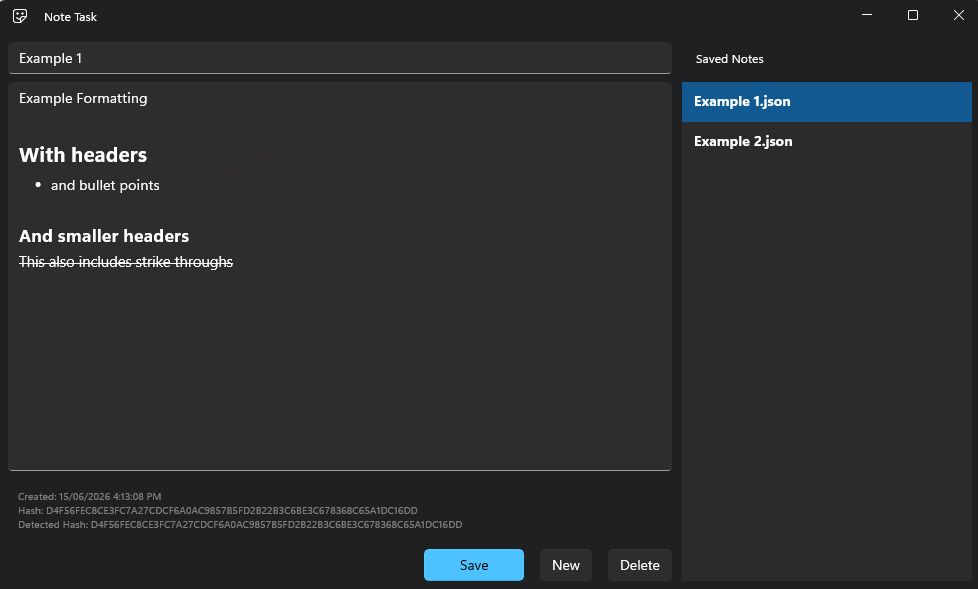
My first WinUI app, open source and currently in development.
I built it to solve a problem I had with Notepad: I wanted a tool where I could create a collection of notes and swap between them on demand, without multiple button clicks or digging through the file explorer.
Custom RTF Cleanup
App visuals
| public static string CleanText(string entry) | |
| { | |
| if (string.IsNullOrEmpty(entry)) | |
| return entry; | |
| entry = entry.TrimEnd('\r', '\n'); | |
| if (entry.StartsWith("{\\rtf", StringComparison.OrdinalIgnoreCase)) | |
| { | |
| var lastBrace = entry.LastIndexOf('}'); | |
| if (lastBrace <= 0) | |
| return entry; | |
| var i = lastBrace - 1; | |
| while (i >= 0) | |
| { | |
| if (char.IsWhiteSpace(entry[i])) | |
| { | |
| i--; | |
| continue; | |
| } | |
| var removed = false; | |
| if (i >= 3 && entry[i - 3] == '\\' | |
| && entry.Substring(i - 3, 4).Equals("\\par", StringComparison.Ordinal)) | |
| { | |
| i -= 4; | |
| removed = true; | |
| } | |
| else if (i >= 4 && entry[i - 4] == '\\' | |
| && entry.Substring(i - 4, 5).Equals("\\line", StringComparison.Ordinal)) | |
| { | |
| i -= 5; | |
| removed = true; | |
| } | |
| else if (i >= 3 && entry[i - 3] == '\\' | |
| && entry.Substring(i - 3, 4).Equals("\\tab", StringComparison.Ordinal)) | |
| { | |
| i -= 4; | |
| removed = true; | |
| } | |
| else if (i >= 4 && entry[i - 4] == '\\' | |
| && entry.Substring(i - 4, 5).Equals("\\pard", StringComparison.Ordinal)) | |
| { | |
| i -= 5; | |
| removed = true; | |
| } | |
| if (removed == false) | |
| break; | |
| } | |
| if (i != lastBrace - 1) | |
| { | |
| string suffix = entry.Substring(lastBrace); | |
| return entry.Substring(0, i + 1) + suffix; | |
| } | |
| } | |
| return entry; | |
| } |
Hash-Based Change Detection
This system tracks unsaved changes more reliably than a simple flag would.
It hashes the cleaned editor content and compares it against the last saved hash to determine whether anything's actually changed, while a loading flag prevents the editor from falsely flagging a freshly opened note as "unsaved" the moment it loads.
A separate forceDirty flag covers formatting-only changes, which should always register as unsaved regardless of what the hash comparison says.
| private void ToggleBullets_Click(object sender, RoutedEventArgs e) | |
| { | |
| var format = NoteEditor.Document.Selection.ParagraphFormat; | |
| if (format.ListType == Microsoft.UI.Text.MarkerType.Bullet) | |
| { | |
| format.ListType = Microsoft.UI.Text.MarkerType.None; | |
| format.SetIndents(0.0f, 0.0f, 0.0f); | |
| } | |
| else | |
| { | |
| format.ListType = Microsoft.UI.Text.MarkerType.Bullet; | |
| format.SetIndents(-indentAmount / 2, indentAmount, 0.0f); | |
| } | |
| forceDirty = true; | |
| GetIsDirty(); | |
| } |
This method cleans the raw RTF content before it's saved, stripping trailing formatting artifacts the editor leaves behind.
Rather than reaching for a third-party RTF library, I wrote a small parser that walks backward through the string and removes trailing control words like \par and \line immediately before the closing brace. Keeping saved files clean this way also makes the hash-based change detection below far more reliable.
| private void GetIsDirty() | |
| { | |
| if (forceDirty) | |
| { | |
| IsDirty = true; | |
| return; | |
| } | |
| if (isLoading) | |
| { | |
| // Ignore the first TextChanged raised while loading content programmatically. | |
| isLoading = false; | |
| IsDirty = false; | |
| return; | |
| } | |
| if (NoteFile == null || string.IsNullOrEmpty(NoteFile.FileContent) || GetTextCache()) | |
| { | |
| IsDirty = false; | |
| return; | |
| } | |
| IsDirty = true; | |
| } | |
| private bool GetTextCache() | |
| { | |
| NoteEditor.TextDocument.GetText(Microsoft.UI.Text.TextGetOptions.FormatRtf, out var content); | |
| if (string.IsNullOrEmpty(content)) | |
| return false; | |
| var context = DocumentUtils.CleanText(content); | |
| var hash = DocumentUtils.GetHash(context); | |
| if (string.IsNullOrEmpty(hash)) | |
| return false; | |
| DetectedHash.Text = $"Detected Hash: {hash}"; | |
| if (NoteFile?.FileHash == hash) | |
| return true; | |
| return false; | |
| } |
Note Task started as a fix for a small daily annoyance, but building it out taught me just as much about careful state management and edge-case handling as any larger project has. It's still actively evolving, with the full source available on GitHub,
Hanging-Indent Bullet Toggling
Toggling bullet points sounds simple until you want them to actually look right.
This handler doesn't just switch the list marker on and off, it also calculates a proper hanging indent, offsetting the first line negatively against a positive paragraph indent, so bulleted text wraps and aligns the way it would in any standard word processor instead of sitting flush against the marker.